

Feedback audiences
The author picks an audience when they give feedback or respond to a request. Only the audiences your company allows appear.
Who else can read feedback
- The author can always read feedback they gave.
- Admins and HR Admins can read feedback about other people. They can’t read feedback about themselves unless its audience includes them.
- A recipient with no manager can read Manager only and Manager hierarchy feedback about themselves.
Author identity
The audience controls who can read the feedback, not whether the author’s name appears. Some feedback hides the author’s identity, and the author shows as Anonymous.Shoutouts make feedback public
When positive feedback becomes a Shoutout, its audience changes to Public. Windy asks the author for confirmation before it creates the Shoutout.Configure feedback settings
You must be an Admin or HR Admin.1
Open Feedback settings
Go to Settings > Feedback. You can also open Feedback actions > Configure feedback settings on the Feedback page.
2
Choose the allowed audiences
Under Visibility options, turn on each audience that people can select when they give feedback. At least one option must stay on.
3
Choose the default audience
Under Default option, select the audience that new feedback and new requests start with. To turn off the current default, choose a different default first.
4
Set the edit window
Under Editing > Edit window, choose how long people can edit or delete feedback after they submit it: No editing, 1 hour, 24 hours, or 7 days.
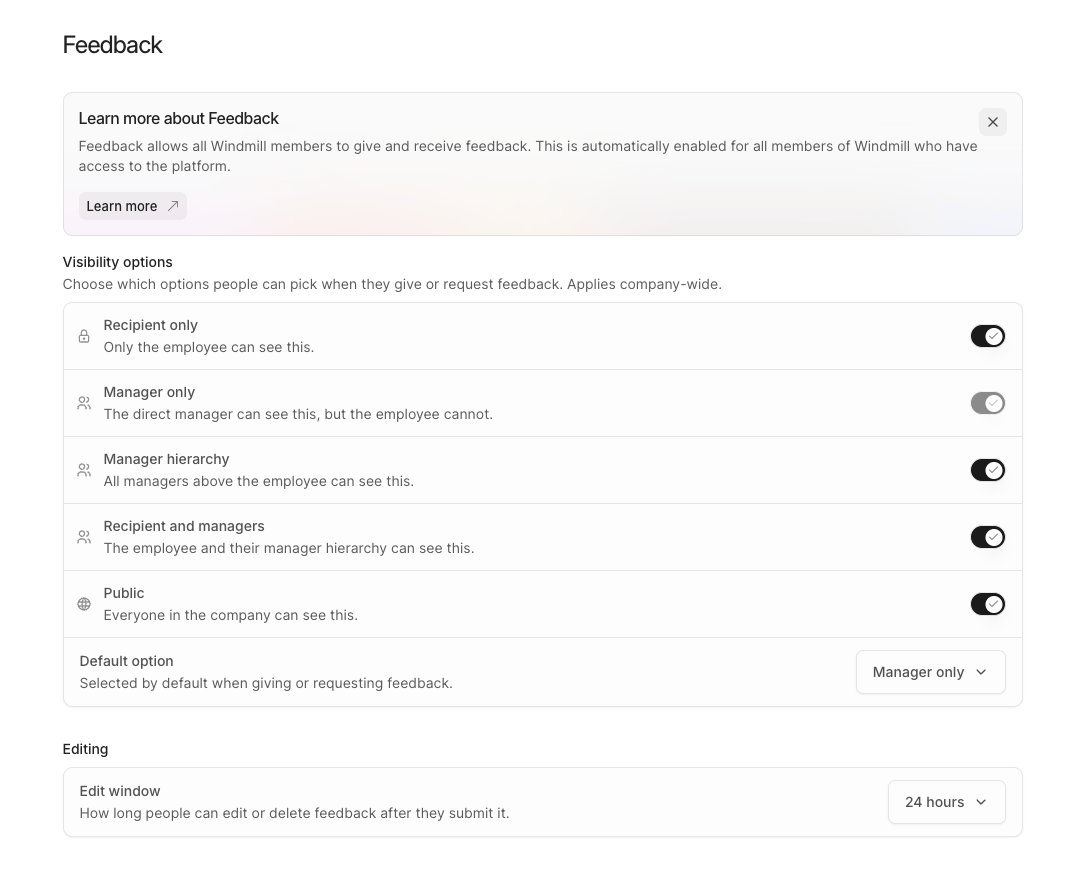
Default settings
How the settings apply
- Leave feedback starts with the default audience. People can change it to another allowed audience.
- Request feedback uses the default audience. The requester can change it while the request is scheduled, and the person who responds can select another allowed audience.
- Windy asks the author to choose an audience when more than one is allowed. When only one is allowed, Windy uses it.
- Edit window applies to the Feedback page, Windy, and MCP. It also applies to Admins and HR Admins who edit colleagues’ feedback.