

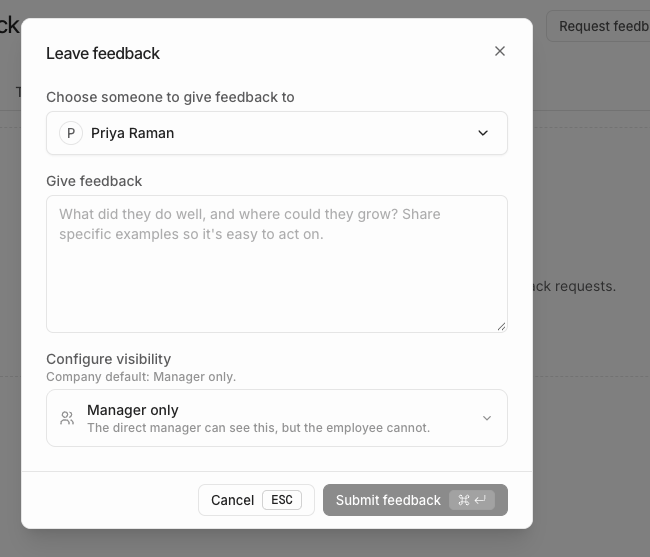
Leave feedback on the Feedback page
1
Select Leave feedback
Open Feedback and select Leave feedback.
2
Choose a colleague
Under Choose someone to give feedback to, search for the member.
3
Write the feedback
Under Give feedback, describe the work and its effect. Include specific examples.
4
Check the visibility
Under Configure visibility, keep the company default or select another allowed audience. See Feedback audiences.
5
Select Submit feedback
Windmill saves the feedback. It appears for everyone in the audience you selected.
Other ways to start
- Press Cmd+K (or Ctrl+K) and select Give feedback.
- Search for a person with Cmd+K and select Give feedback from their actions. Windmill fills in the person for you.
Give feedback with Windy
Start a conversation with Windy in Slack or in the Windmill Dashboard.“@Windy, I want to give feedback about [person’s name].”
Tips for useful feedback
- Be specific. Describe what the person did, not their personality.
- Explain the effect. Say how the work helped the team, a customer, or a project.
- Give it soon. Feedback is most useful while the work is still fresh.
Next steps
- Request feedback from your colleagues.
- Edit or delete feedback you gave.