

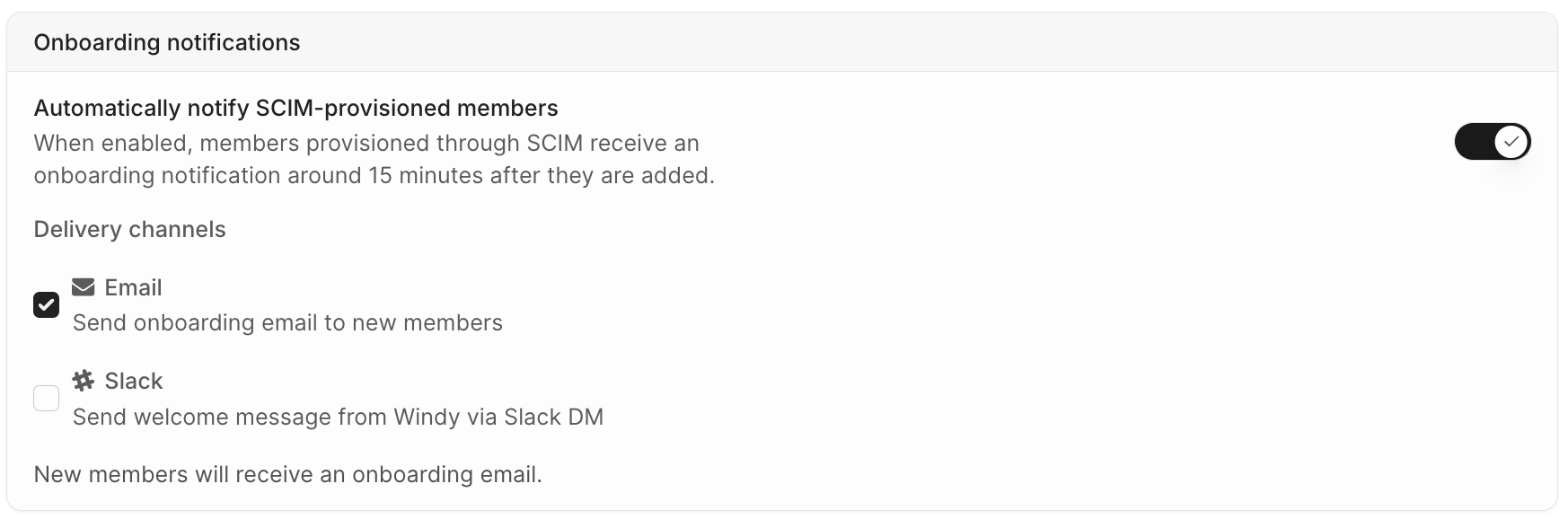
The Onboarding notifications card in Settings > Security.
Turn on onboarding notifications
Admins, HR Admins, and Integration Managers can change this setting. The controls are available when SCIM or Rippling is used for member provisioning.1
Go to Settings > Security
Open Security and find the Onboarding notifications card.
2
Turn on automatic notifications
Turn on the Automatically notify provisioned members toggle. The label shows SCIM or Rippling based on your provisioning source. Both delivery channels turn on.
3
Choose delivery channels
Keep both channels, or clear the one you do not want. Clearing both channels turns onboarding notifications off.
Delivery channels
- Email: Sends an onboarding email to the member’s work email. When SSO is active, the email contains a Login button that opens your SSO sign-in page. Without SSO, the email contains a link to accept the invitation.
- Slack: Sends a welcome message from Windy in a Slack direct message. Slack delivery requires a connected Slack workspace and a matched Slack account for the member.
When notifications are sent
Windmill sends a notification when a member gains access through provisioning:- New members: Members provisioned for the first time receive a notification.
- Reactivated members: Members who lost access and are provisioned again receive a new notification.
Turning on onboarding notifications does not notify members who were provisioned earlier. Use Send welcome message on the Members page to notify them individually or as a group. See Sending welcome messages manually.
FAQs
Why did a provisioned member not receive a notification?
Why did a provisioned member not receive a notification?
Check these conditions:
- Onboarding notifications were on before the member was provisioned.
- The member still has access. Members who lose access before the notification is sent are skipped.
- For Slack, the Slack integration is connected and Windmill matched the member’s Slack account.
- The member did not receive another invite notification in the last 24 hours.
- For Rippling, provisioning itself can take up to a day after you assign access.
Does a member get notified again on every SCIM or Rippling update?
Does a member get notified again on every SCIM or Rippling update?
No. Windmill notifies a member only when they gain access—on first provisioning or on reactivation after access was removed. Profile updates from your identity provider do not trigger notifications.
Does this apply to members created through SSO sign-in?
Does this apply to members created through SSO sign-in?
No. Onboarding notifications apply to members provisioned through SCIM or Rippling. A member created by a first SSO sign-in has already signed in, so Windmill does not send a notification.