> ## Documentation Index
> Fetch the complete documentation index at: https://help.gowindmill.com/llms.txt
> Use this file to discover all available pages before exploring further.
# Granola
> Connect Granola to Windmill so meeting notes and transcripts captured in Granola flow into 1:1s, recaps, and Windy's context for the right participants.
## Benefits of connecting Granola to Windmill
Connecting Granola to Windmill brings your meeting notes and transcripts into Windy's context — so nothing from your conversations gets lost.
* Granola recordings appear linked to their matching 1:1 in Windmill
* Windy has access to every Granola meeting visible to your connection — notes you own, notes shared with you, and anything in folders you can see
* Richer [Catch Me Up](/features/1-on-1s/catch-me-up) reports that can cite real meeting content
* Meeting context surfaces in suggested topics, recaps, and performance reviews
* Discussions and decisions get captured as they happen, not months later
Granola content is used as **context** for Windy — it is not automatically imported into your 1:1 notes. See [Where Granola content shows up](#where-granola-content-shows-up-in-windmill) for the full picture.
## How to connect Granola
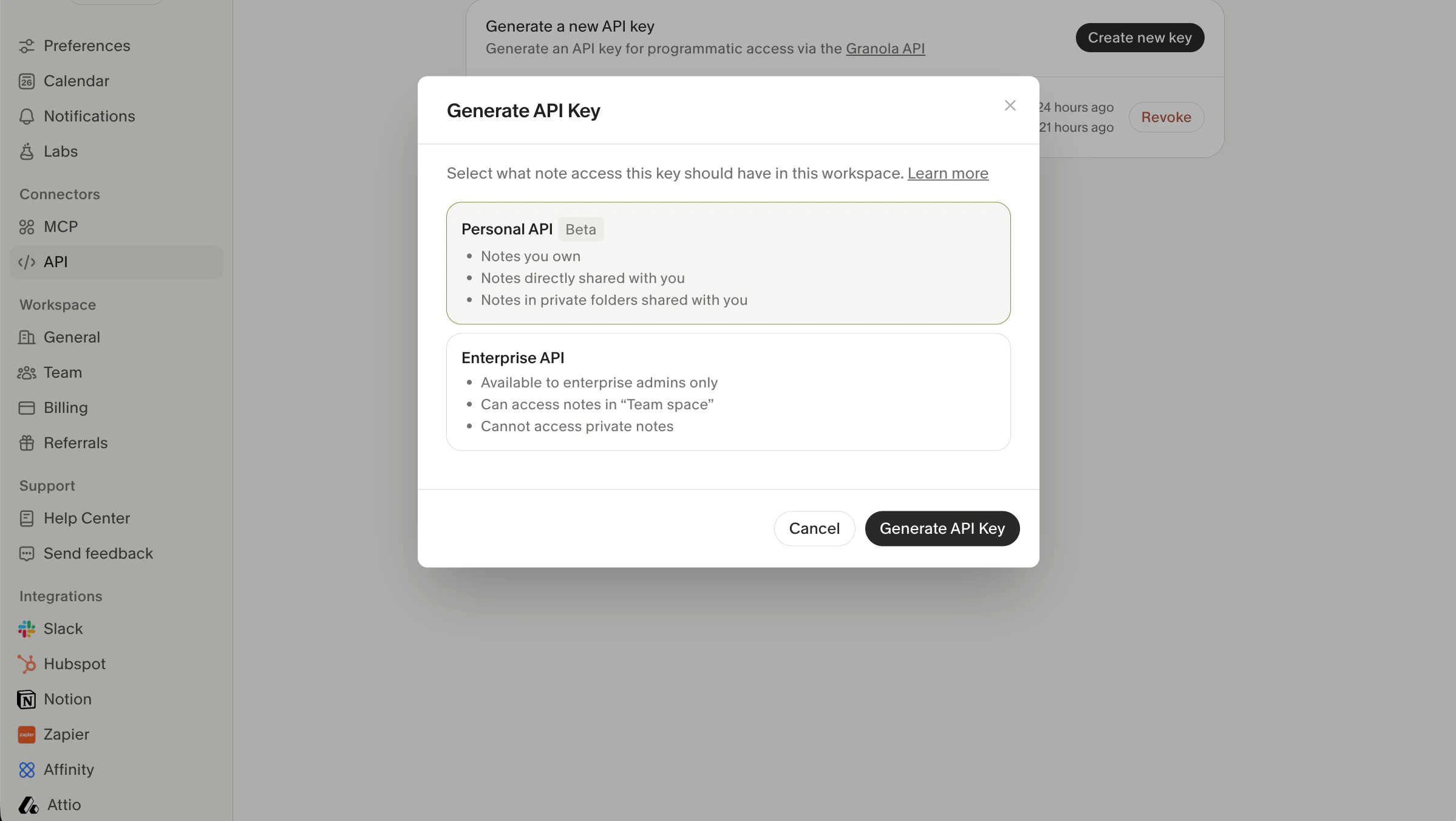
In Granola, go to **Connectors > API** in the sidebar. Click **Create new key**, then select either **Personal API** or **Enterprise API** depending on your use case. See [API Key Types](#api-key-types) below for details on each option.
 In Windmill, navigate to [Settings > Integrations](https://app.gowindmill.com/COMPANY/config/integrations), find **Granola**, and click **Connect**. Select the key type that matches the key you generated in Granola.
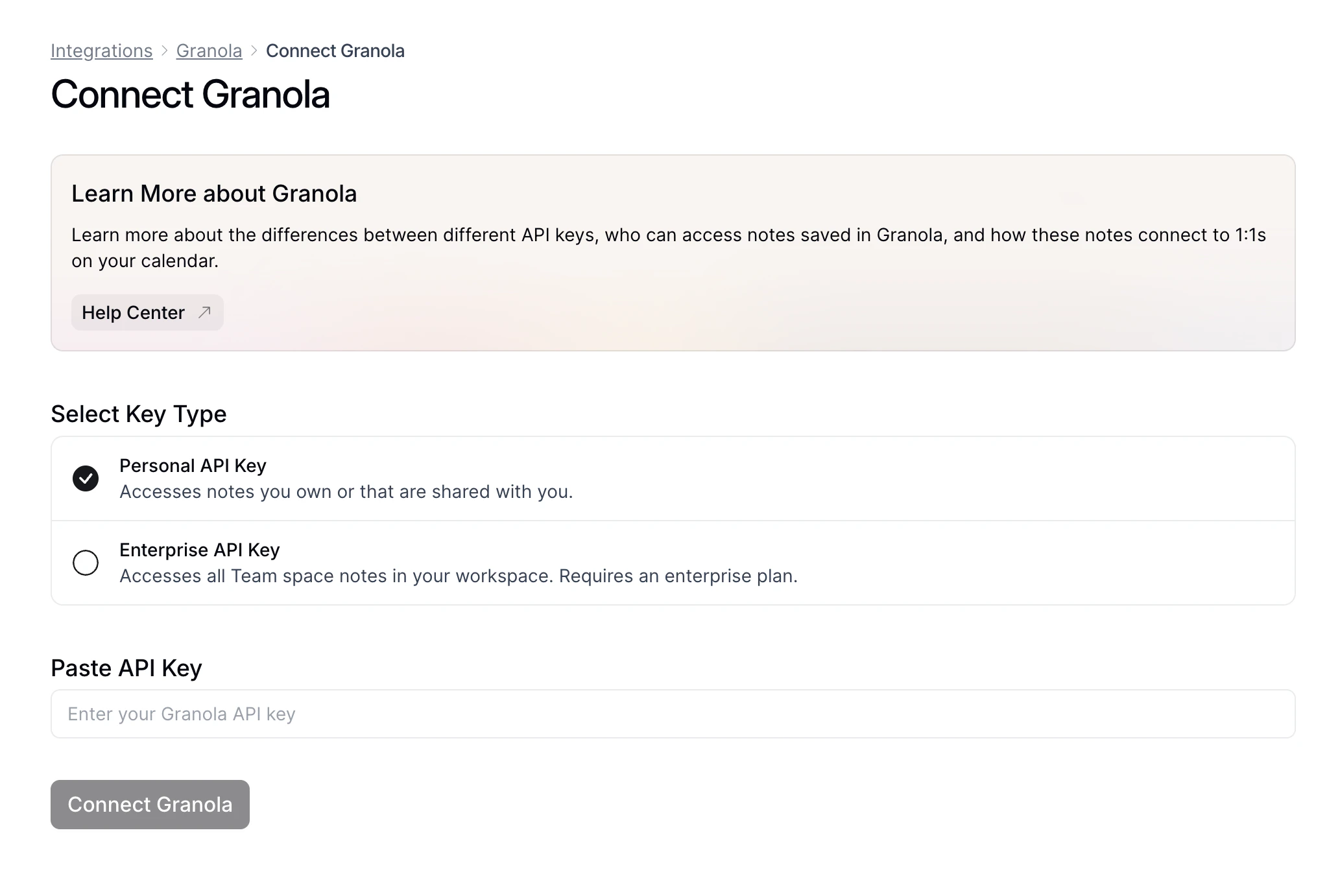 Paste the API key from Granola into the input field and click **Connect Granola**. Recordings you have access to in Granola will begin syncing within the hour.
When you first connect Granola, Windmill backfills the last 90 days of recordings you have access to. Newer recordings continue syncing every hour.
## API key types
Granola supports two types of API keys, each with different access levels. The key type you choose affects who can see the synced recordings in Windmill.
### Personal API key
* Available to all Granola users (currently in Beta)
* Syncs recordings you have access to in Granola — including notes you own, notes directly shared with you, and notes in private folders shared with you
* In Windmill, all data synced through a Personal API key is **private to the user who created the connection** — no one else can see it
We recommend that each Granola user creates their own Personal connection. This is the best way to ensure everyone has access to the recordings available to them in Granola.
### Enterprise API key
* Available to enterprise admins only (requires a Granola enterprise plan)
* Accesses all notes in your Granola "Team space" — cannot access private notes
* In Windmill, each recording synced through an Enterprise key is visible **only to the recording's owner** (if they're a Windmill member). It is not visible to anyone else, even if the note was shared with them in Granola.
Granola's API doesn't expose who a note has been shared with, so Windmill can't reliably tell which other users should have access. To avoid leaking recordings to people who shouldn't see them, Windmill restricts visibility to the recording's owner only.
If you want everyone to see the recordings they have access to in Granola, have each user connect with their own [Personal API key](#personal-api-key) instead.
## Connected data
When Granola is connected, Windmill securely reads the following information:
| Data Type | How Windmill Uses It |
| --------------------------- | ------------------------------------------------------------------------------- |
| Meeting notes and summaries | Available to Windy as context; may be cited in Catch Me Up and suggested topics |
| Transcripts | Powers Windy's analytics and insights on your work |
| Recording metadata | Matches recordings to 1:1s via calendar event ID |
Granola data syncs into Windmill's **Recording** data model, making it available to Windy and linkable from 1:1s, recaps, and performance reviews.
## Where Granola content shows up in Windmill
Granola content flows into Windmill in three distinct places. It helps to keep these separate — they behave differently.
### Linked recordings on 1:1s
When a Granola recording matches a 1:1, Windmill shows the recording as a **link** on that 1:1. Clicking it opens the notes and transcript.
Windmill matches recordings to 1:1s using two methods:
1. **Calendar event matching** — Windmill links recordings based on the underlying calendar event ID. This is the primary method and works when both Granola and Windmill are connected to the same calendar.
2. **Smart fallback** — If a calendar event ID isn't available, Windmill uses the meeting time and attendees to identify the correct 1:1.
The link appears for whoever connected Granola and has access to the recording. If both the manager and their direct report want to see the recording on the 1:1, both need to connect Granola **and** the recording needs to be shared in Granola (see [Sharing recordings across users](#sharing-recordings-across-users)).
### Catch Me Up reports
Catch Me Up reports get you up to speed ahead of a 1:1. Learn more in [1:1s → Catch Me Up](/features/1-on-1s/catch-me-up).
If you've connected Granola, Granola notes **can** surface as a source in Catch Me Up — but it's not guaranteed:
* Catch Me Up is dynamic. Content is pulled from available sources each time the report is generated.
* A Granola recording will only be considered if it existed when the report was generated. Recordings from meetings that happened *after* the last generation won't appear until the report regenerates.
* You can click **Regenerate** on the Catch Me Up panel to re-run it with the latest data.
* Only your own Granola connection is used. The other person's Granola auth has no effect on what appears in your Catch Me Up.
### Granola will not automatically populate the shared 1:1 notes space
Granola notes are **not** copied or imported into the shared 1:1 notes section. The 1:1 notes space is for what you and your counterpart write together in Windmill — it stays separate from the Granola recording linked above.
If you want to pull Granola content into your 1:1 notes, you can copy and paste it manually.
To land Granola content **inside** the shared 1:1 agenda, use **Import Granola Notes** (per-1:1, takes a share link) or **Import 1:1 Notes** (on an employee profile, paste past text). Both are separate from this integration — see [Importing notes to 1:1s](/features/1-on-1s/importing-notes).
### Windy
Windy has access to **every Granola meeting visible to your connection** — notes you own, notes shared with you, and anything in folders you can see. You can ask Windy about past meetings, decisions, or context, and Windy can cite Granola recordings in its responses.
This applies to all Granola recordings, including non-meeting recordings (dictation, brainstorming, solo notes). Those still sync and are available to Windy — they just won't be matched to a specific 1:1.
Windmill syncs with Granola **once per hour**. New recordings may take up to an hour to appear.
## Sharing recordings across users
Granola recordings are **private to the person who recorded them** by default.
For a recording to be visible to both people in Windmill:
1. The recording must be **shared in Granola** — either moved into a shared folder, or recorded directly into one.
2. Both people must **connect Granola to Windmill** with their own Personal API key.
Without both of these, the recording will only show up for the person whose Granola connection has access to it.
If a 1:1 should be visible to both participants in Windmill, agree upfront on which Granola folder you'll record into — and make sure you've both connected Granola.
## Permissions
Windmill requests **read-only** access to Granola.
| Permission | Purpose |
| -------------------- | ------------------------------------------------------------------ |
| Read recording data | To sync meeting notes, transcripts, and metadata into Windmill |
| Read-only access | Windmill never creates, modifies, or deletes anything in Granola |
| One-way sync | Data flows from Granola to Windmill only — nothing is written back |
| Access scoped by key | Visibility in Windmill depends on the API key type used to connect |
## FAQs
No. Windmill is 100% read-only. It never creates, modifies, or deletes recordings, notes, or any other data in Granola.
Windmill syncs with Granola once per hour. New recordings will appear within an hour of being created in Granola. When you first connect, Windmill also backfills the last 90 days of recordings.
**Personal API keys** are available to all Granola users and sync recordings you have access to in Granola — including notes you own or that are shared with you. All synced data is private to you in Windmill.
**Enterprise API keys** are available to Granola enterprise admins and sync all Team space notes. In Windmill, each recording is visible only to its owner in Granola.
See [API Key Types](#api-key-types) for full details.
Yes — and we recommend it. Each person should create their own connection using a Personal API key. This is the only way to ensure everyone has access to the recordings available to them in Granola.
Visibility depends on which API key type was used to connect. With a Personal API key, only you can see the recordings synced through your connection. With an Enterprise key, each recording is only visible to its owner in Granola — even if the note was shared with you. If you're missing recordings you have access to in Granola, try creating your own Personal connection.
Granola content isn't copied into the shared 1:1 notes section — that space is for what you and your counterpart write together. Granola recordings show up as a **link** on the 1:1 instead. If you want the Granola content in your notes, copy and paste it in.
It can, but it's not guaranteed. Catch Me Up only considers Granola recordings that existed when the report was generated, and only pulls them in when relevant. If a recent meeting isn't showing up, the person generating the report can click **Regenerate** on the Catch Me Up panel. Only that person's own Granola connection feeds their Catch Me Up — your personal Granola auth doesn't change what appears there.
Yes — Windy has access to every Granola meeting visible to your connection, including notes you own, notes shared with you, and anything in folders you can see. You can ask Windy about past meetings and it can cite Granola as a source.
Yes, but two things need to be true: the recording has to be shared in Granola (moved to or recorded in a shared folder), and both people need to connect Granola to Windmill with their own Personal API key. Without both, the recording will only appear for the person whose Granola connection has access to it.
They still sync into Windmill and are available to Windy. They just won't be matched to a specific 1:1.
Paste the API key from Granola into the input field and click **Connect Granola**. Recordings you have access to in Granola will begin syncing within the hour.
When you first connect Granola, Windmill backfills the last 90 days of recordings you have access to. Newer recordings continue syncing every hour.
## API key types
Granola supports two types of API keys, each with different access levels. The key type you choose affects who can see the synced recordings in Windmill.
### Personal API key
* Available to all Granola users (currently in Beta)
* Syncs recordings you have access to in Granola — including notes you own, notes directly shared with you, and notes in private folders shared with you
* In Windmill, all data synced through a Personal API key is **private to the user who created the connection** — no one else can see it
We recommend that each Granola user creates their own Personal connection. This is the best way to ensure everyone has access to the recordings available to them in Granola.
### Enterprise API key
* Available to enterprise admins only (requires a Granola enterprise plan)
* Accesses all notes in your Granola "Team space" — cannot access private notes
* In Windmill, each recording synced through an Enterprise key is visible **only to the recording's owner** (if they're a Windmill member). It is not visible to anyone else, even if the note was shared with them in Granola.
Granola's API doesn't expose who a note has been shared with, so Windmill can't reliably tell which other users should have access. To avoid leaking recordings to people who shouldn't see them, Windmill restricts visibility to the recording's owner only.
If you want everyone to see the recordings they have access to in Granola, have each user connect with their own [Personal API key](#personal-api-key) instead.
## Connected data
When Granola is connected, Windmill securely reads the following information:
| Data Type | How Windmill Uses It |
| --------------------------- | ------------------------------------------------------------------------------- |
| Meeting notes and summaries | Available to Windy as context; may be cited in Catch Me Up and suggested topics |
| Transcripts | Powers Windy's analytics and insights on your work |
| Recording metadata | Matches recordings to 1:1s via calendar event ID |
Granola data syncs into Windmill's **Recording** data model, making it available to Windy and linkable from 1:1s, recaps, and performance reviews.
## Where Granola content shows up in Windmill
Granola content flows into Windmill in three distinct places. It helps to keep these separate — they behave differently.
### Linked recordings on 1:1s
When a Granola recording matches a 1:1, Windmill shows the recording as a **link** on that 1:1. Clicking it opens the notes and transcript.
Windmill matches recordings to 1:1s using two methods:
1. **Calendar event matching** — Windmill links recordings based on the underlying calendar event ID. This is the primary method and works when both Granola and Windmill are connected to the same calendar.
2. **Smart fallback** — If a calendar event ID isn't available, Windmill uses the meeting time and attendees to identify the correct 1:1.
The link appears for whoever connected Granola and has access to the recording. If both the manager and their direct report want to see the recording on the 1:1, both need to connect Granola **and** the recording needs to be shared in Granola (see [Sharing recordings across users](#sharing-recordings-across-users)).
### Catch Me Up reports
Catch Me Up reports get you up to speed ahead of a 1:1. Learn more in [1:1s → Catch Me Up](/features/1-on-1s/catch-me-up).
If you've connected Granola, Granola notes **can** surface as a source in Catch Me Up — but it's not guaranteed:
* Catch Me Up is dynamic. Content is pulled from available sources each time the report is generated.
* A Granola recording will only be considered if it existed when the report was generated. Recordings from meetings that happened *after* the last generation won't appear until the report regenerates.
* You can click **Regenerate** on the Catch Me Up panel to re-run it with the latest data.
* Only your own Granola connection is used. The other person's Granola auth has no effect on what appears in your Catch Me Up.
### Granola will not automatically populate the shared 1:1 notes space
Granola notes are **not** copied or imported into the shared 1:1 notes section. The 1:1 notes space is for what you and your counterpart write together in Windmill — it stays separate from the Granola recording linked above.
If you want to pull Granola content into your 1:1 notes, you can copy and paste it manually.
To land Granola content **inside** the shared 1:1 agenda, use **Import Granola Notes** (per-1:1, takes a share link) or **Import 1:1 Notes** (on an employee profile, paste past text). Both are separate from this integration — see [Importing notes to 1:1s](/features/1-on-1s/importing-notes).
### Windy
Windy has access to **every Granola meeting visible to your connection** — notes you own, notes shared with you, and anything in folders you can see. You can ask Windy about past meetings, decisions, or context, and Windy can cite Granola recordings in its responses.
This applies to all Granola recordings, including non-meeting recordings (dictation, brainstorming, solo notes). Those still sync and are available to Windy — they just won't be matched to a specific 1:1.
Windmill syncs with Granola **once per hour**. New recordings may take up to an hour to appear.
## Sharing recordings across users
Granola recordings are **private to the person who recorded them** by default.
For a recording to be visible to both people in Windmill:
1. The recording must be **shared in Granola** — either moved into a shared folder, or recorded directly into one.
2. Both people must **connect Granola to Windmill** with their own Personal API key.
Without both of these, the recording will only show up for the person whose Granola connection has access to it.
If a 1:1 should be visible to both participants in Windmill, agree upfront on which Granola folder you'll record into — and make sure you've both connected Granola.
## Permissions
Windmill requests **read-only** access to Granola.
| Permission | Purpose |
| -------------------- | ------------------------------------------------------------------ |
| Read recording data | To sync meeting notes, transcripts, and metadata into Windmill |
| Read-only access | Windmill never creates, modifies, or deletes anything in Granola |
| One-way sync | Data flows from Granola to Windmill only — nothing is written back |
| Access scoped by key | Visibility in Windmill depends on the API key type used to connect |
## FAQs
No. Windmill is 100% read-only. It never creates, modifies, or deletes recordings, notes, or any other data in Granola.
Windmill syncs with Granola once per hour. New recordings will appear within an hour of being created in Granola. When you first connect, Windmill also backfills the last 90 days of recordings.
**Personal API keys** are available to all Granola users and sync recordings you have access to in Granola — including notes you own or that are shared with you. All synced data is private to you in Windmill.
**Enterprise API keys** are available to Granola enterprise admins and sync all Team space notes. In Windmill, each recording is visible only to its owner in Granola.
See [API Key Types](#api-key-types) for full details.
Yes — and we recommend it. Each person should create their own connection using a Personal API key. This is the only way to ensure everyone has access to the recordings available to them in Granola.
Visibility depends on which API key type was used to connect. With a Personal API key, only you can see the recordings synced through your connection. With an Enterprise key, each recording is only visible to its owner in Granola — even if the note was shared with you. If you're missing recordings you have access to in Granola, try creating your own Personal connection.
Granola content isn't copied into the shared 1:1 notes section — that space is for what you and your counterpart write together. Granola recordings show up as a **link** on the 1:1 instead. If you want the Granola content in your notes, copy and paste it in.
It can, but it's not guaranteed. Catch Me Up only considers Granola recordings that existed when the report was generated, and only pulls them in when relevant. If a recent meeting isn't showing up, the person generating the report can click **Regenerate** on the Catch Me Up panel. Only that person's own Granola connection feeds their Catch Me Up — your personal Granola auth doesn't change what appears there.
Yes — Windy has access to every Granola meeting visible to your connection, including notes you own, notes shared with you, and anything in folders you can see. You can ask Windy about past meetings and it can cite Granola as a source.
Yes, but two things need to be true: the recording has to be shared in Granola (moved to or recorded in a shared folder), and both people need to connect Granola to Windmill with their own Personal API key. Without both, the recording will only appear for the person whose Granola connection has access to it.
They still sync into Windmill and are available to Windy. They just won't be matched to a specific 1:1.